I am running the following PowerShell script that moves an object from one OU to another in our Entra tenant.

Note this is an Entra id guest account that exists. It finds the account using Get-AdmObject by UPN. The distinguished name reference is correct as the target OU.

Is the path syntax different because its a container vs an OU? I have tried using the distinguished name, adsPath and objectGuid of the target location object with the same results.

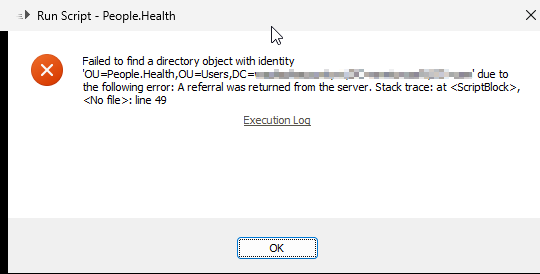
But when I try to move the object to the new OU, it returns the following error: image.png
$upn = "email_domain.com#EXT#@domain.onmicrosoft.com"

<# Only used to get the domain object #>
$domainDN = "%distinguishedName%"
$domain = $Context.GetObjectDomain($domainDN)

$Context.LogMessage("$domain", "Information")

<# works getting user by upn on domain #>
try {
    $user = Get-AdmObject -Filter {userPrincipalName -eq $upn} -Server $domain -AdaxesService localhost                
}
catch [System.Exception] {
    $Context.LogException("Error: Get-AdmUser threw exception when trying to find guest user by UPN")        
}

 <# adaxes account found with matching upn #>
if (-not $user) {
    $Context.LogException("No user found in Adaxes by UPN $upn")
}

$Context.LogMessage("$($user.objectGUID)", "Information")

Move-AdmObject -Identity $user -TargetPath "%distinguishedName%"
ago by (210 points)

1 Answer

ago by (309k points)
+1 vote

Hello,

It looks like there was an attempt to move a Microsoft Entra account to an on-premises AD OU. Most probably, it happens because the -AdaxesService and -Server parameters are not specified when the Move-AdmObject cmdlet is executed. They are always required when you use Adaxes cmdlets to manage Microsoft Entra objects. To make things easier, you can try using the ADSI approach. For an example, have a look at the following article: https://adaxes.com/sdk/SampleScripts.MovingUserAccounts.

ago by (210 points)
0

You are 100% correct. I was looking in the wrong spot the entire time. Thank you! Final working code was as follows:

Move-AdmObject -Identity $user -TargetPath "%distinguishedName%" -Server $domain -AdaxesService localhost                

Related questions

Hi again, My user object creation process use many business rules, one of these moving the object to the right container according to somme attributes. The problem is that sometimes, ... . I run the latest version of Adaxes (3.2.7831). Thanks for your help

asked Feb 10, 2012 by sroux (800 points)
0 votes
1 answer

I am trying to find a way to get an hourly report on locked out user accounts to only be sent if the total amout of locked out account exceeds 10 users. Is this possible in ... a way to setup the logic to check to see how many items are returned in a report.

asked Jun 12, 2024 by Vertigo (50 points)
0 votes
1 answer

I have a scheduled task that runs the following PowerShell script. $user = New-AdmUser -Server $domain -AdaxesService localhost -Path $workdayDn -ChangePasswordAtLogon $true -PassThru - ... ) over all objects. I'm stumped! Any help would be super appreciated.

asked Sep 5, 2024 by emeisner (210 points)
0 votes
1 answer

Hi Using 2018.1 (3.9.15631.0) I'm not sure if this is an issue as such, or if it is a known thing with the Adaxes powershell commands but when using the Move-AdmObject command within a Try statement, if the command fails the error is not caught. Thanks

asked Aug 10, 2018 by chappers77 (2.0k points)
0 votes
1 answer

I need a list of all the URLs that Adaxes creates in IIS on the server Adaxes is installed on.

asked Feb 6, 2020 by DaralenManta (20 points)
0 votes
1 answer