Currently when I build an account in the Web UI it sets the userPrincipalName to corporate.******.org. What I need it to do is set it to ******.org without the corporate. I have tried many different things to remove the corporate but no luck for me. I have tried to just delete the corporate when making the username but it wont let me change it. Thanks

by (420 points)

1 Answer

by (216k points)
0 votes

Hello,

To accomplish your task, you'll need to modify the Property Pattern that specifies constraints and value generation templates for the User object type. By default, this is done by the built-in User Pattern. To modify by the built-in User Pattern:

  1. Launch Adaxes Administration Console.
  2. Expand the service node that represents your Adaxes service.
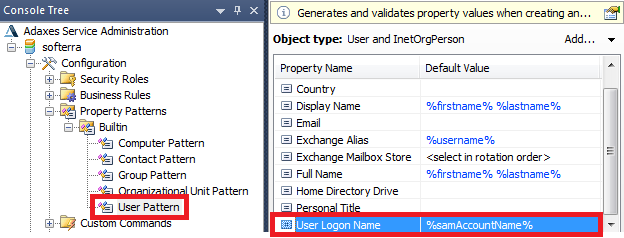
  3. Expand Configuration \ Property Patterns \ Builtin.
  4. Select the User Pattern. The constraints and value generation templates imposed by this Property pattern will be displayed in the Result Pane (located to the right).
  5. Double-click the Property Pattern item for the User Logon Name property.
  6. Specify the following in the Generate default value field: %samAccountName%@******.org.
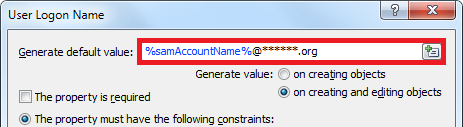
  7. Click OK and save the Property Pattern.

Important: If you are going to use the modified Property Pattern in combination with the PowerShell script provided in Unique Username, the script also needs to be modified. Please reply in this topic to the question regarding the last name so that we could incorporate both the modifications together.

by (216k points)
0

Important: If you are going to use the modified Property Pattern in combination with the PowerShell script provided in Unique Username, the script also needs to be modified. Please reply in this topic to the question regarding the last name so that we could incorporate both the modifications together.

See a modified version of the script that takes into account your custom UPN suffix in Unique Username.

Related questions

I have a custom adaxes attribute that I would like to utlitize in Rule Based groups; it does not look like they are available to select, however. Example: want something ... to group. Is this possible to make them visable in the Rule Based queries somehow?

asked May 28 by stevemkoenig (40 points)
0 votes
1 answer

Hello, Thank you for the clarification. I understand that, as of today, Adaxes does not provide built-in functionality to create Microsoft Entra (Azure AD) guest ... insight you can share regarding roadmap status or long-term direction. Kind regards, Willem

asked Apr 24 by IwistIT (140 points)
0 votes
1 answer

Hello I am looking fro information on managing custom attributes in Adaxes. I would like to create two custom attributes: Self Service Enrollment Stauts Object Type While ... " column above is not a slectable attribute for some reason. Software version:

asked Dec 10, 2025 by apruitt (490 points)
0 votes
1 answer

For any given AD attribute, I'd like to be able to retrieve the defined friendly name for it. Example: l = City, st = State, etc. Is there a way to do that in PowerShell? Thanks!

asked Aug 8, 2025 by jaymallery (60 points)
0 votes
1 answer

Can you let me know how to simultaneously add a value to a custom attribute to both the AD and Entra user objects? The graphical interface update only does it to the AD user object. Thanks.

asked Mar 25, 2025 by msheppard (880 points)
0 votes
1 answer