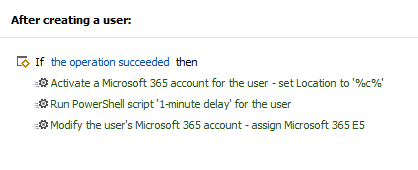
This issue may occur when activating a Microsoft 365 account for a user and assigning licenses in the same action.
Symptoms
The following error is returned:
License assignment cannot be done for user with invalid usage location.
Cause
This may be caused by recent changes on the Microsoft side that may have introduced internal propagation delays for the usageLocation property.
Solution
We are currently investigating the exact cause and working on a permanent fix.
As a workaround, split the action into two separate actions. One to activate the account and another to assign licenses. Then, insert a Run a program or PowerShell script action that adds a 1-minute delay between them.